
P
P.
Administrator
Teammitglied
- 56
- 16
- SwitchPro 1.14
- #1
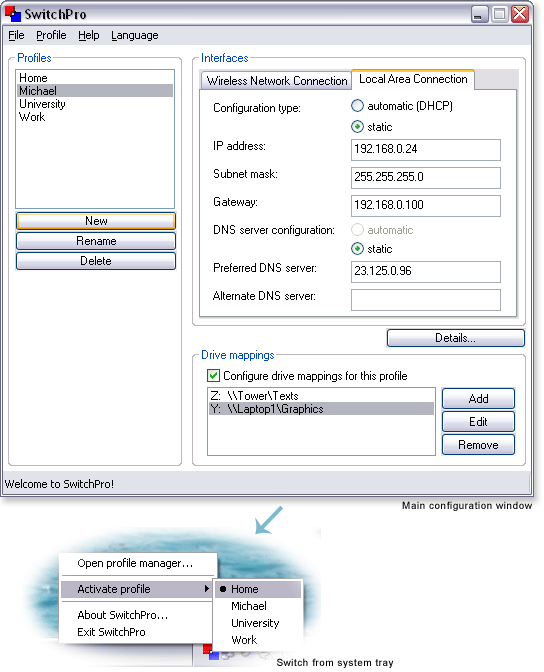
SwitchPro bietet bequemes Umschalten zwischen Netzwerkprofilen unter Windows XP und Windows 2000. Wenn Sie ein Notebook verwenden und es leid sind, sich Dutzende von IP-Adressen und Netzwerkmasken für die verschiedenen Orte, die Sie besuchen, zu merken und einzugeben, möchten Sie vielleicht eine professionelle Lösung für die Änderung Ihrer Netzwerkeinstellungen wählen. Wechseln Sie mit nur einem Klick zwischen Netzwerkprofilen aus dem Windows System-Tray. Speichern Sie die vollständige Netzwerkkonfiguration, ohne die Werte manuell zu kopieren. Ein Profil umfasst Ihre Netzwerkeinstellungen, Ihre Laufwerkszuordnungen und Netzwerkfreigaben (die Verzeichnisse, die Sie in diesem Kontext freigeben möchten). Lassen Sie SwitchPro sich so viele Profile merken, wie Sie benötigen. Unterstützung für eine unbegrenzte Anzahl von Netzwerkgeräten.
Zuletzt bearbeitet:
 Ich denke es gibt einige Leute wie mich, die auch unter Mac OS X das neue Windows 10 ausprobieren wollen.
Eine Virtuelle Maschine ...
Ich denke es gibt einige Leute wie mich, die auch unter Mac OS X das neue Windows 10 ausprobieren wollen.
Eine Virtuelle Maschine ... Unter Windows 11 ist ein vollständiges Backup möglicherweise der beste Weg, um die Installation und Ihre Dateien vor Hardwarefehlern, ...
 Auch Windows 10 wird, wie bereits Windows 7 und Windows 8.1, mit einem Ordner ausgestattet sein, der sich „Eigene Dateien“ ...
 Seit Oktober 2021 ist die endgültige Version von Windows 11 offiziell erhältlich. Ähnlich wie bei früheren Versionen des Betriebssystems hat ...